How to Type Accents on Mac
To type accents on a Mac, press Option with the mark's key, let go, then type the letter: Option+E, then E gives é. Option+`, Option+I, Option+U and Option+N do the grave, circumflex, umlaut and tilde. Or press and hold the letter and pick from the menu. The Character Viewer, Fn/Globe+E, finds the rest.
Which keys type each accent on a Mac?
Every one of the 261 letters in AccentPad's catalogue, counted once for both cases, has a documented method on a Mac. Each row is one mark and one way of typing some of its letters, with the steps for the first of them; the others in the row are typed the same way. A letter with two marks, such as ǖ, is listed under both. A capital takes Shift on the last key: É is Option+E, then Shift+E.
| Mark | Letters | How to type them on a Mac |
|---|---|---|
| Acute accent | á é í ó ú | For á: Option+E, then A. |
| ć ń | For ć: Press and hold C, then choose ć. | |
| ǻ ấ ắ ḉ ḗ ế ǵ ḯ ḱ ĺ ḿ ṍ ṓ ố ớ ṕ ŕ ś ṥ ǘ ṹ ứ ẃ ý ź | For ǻ: Fn/Globe+E, then search "latin small letter a with ring above and acute", then ǻ. | |
| Diaeresis (umlaut) | ä ë ï ö ü ÿ | For ä: Option+U, then A. |
| ǟ ḧ ḯ ȫ ṏ ẗ ǖ ǘ ǚ ǜ ṻ ẅ ẍ | For ǟ: Fn/Globe+E, then search "latin small letter a with diaeresis and macron", then ǟ. | |
| Grave accent | à è ì ò ù | For à: Option+`, then A. |
| ầ ằ ḕ ề ǹ ṑ ồ ờ ǜ ừ ẁ ỳ | For ầ: Fn/Globe+E, then search "latin small letter a with circumflex and grave", then ầ. | |
| Circumflex | â ê î ô û | For â: Option+I, then A. |
| ấ ầ ẩ ẫ ậ ĉ ế ề ể ễ ệ ĝ ĥ ĵ ố ồ ổ ỗ ộ ŝ ŵ ŷ ẑ | For ấ: Fn/Globe+E, then search "latin small letter a with circumflex and acute", then ấ. | |
| Tilde | ã ñ õ | For ã: Option+N, then A. |
| ẽ | For ẽ: Press and hold E, then choose ẽ. | |
| ẫ ẵ ễ ĩ ȭ ṍ ṏ ỗ ỡ ũ ṹ ữ ṽ ỹ | For ẫ: Fn/Globe+E, then search "latin small letter a with circumflex and tilde", then ẫ. | |
| Caron | č ě | For č: Press and hold C, then choose č. |
| ǎ ď ǧ ȟ ǐ ǰ ǩ ľ ň ǒ ř š ṧ ť ǔ ǚ ž | For ǎ: Fn/Globe+E, then search "latin small letter a with caron", then ǎ. | |
| Cedilla | ç | For ç: Option+C. |
| ḉ ḑ ȩ ḝ ģ ḩ ķ ļ ņ ŗ ş ţ | For ḉ: Fn/Globe+E, then search "latin small letter c with cedilla and acute", then ḉ. | |
| Stroke | ø | For ø: Option+O. |
| đ ħ ł ŧ | For đ: Fn/Globe+E, then search "latin small letter d with stroke", then đ. | |
| Dot above | ė | For ė: Press and hold E, then choose ė. |
| ǡ ȧ ḃ ċ ḋ ḟ ġ ḣ İ ṁ ṅ ȯ ȱ ṗ ṙ ṡ ṥ ṧ ṩ ṫ ẇ ẋ ẏ ż | For ǡ: Fn/Globe+E, then search "latin small letter a with dot above and macron", then ǡ. | |
| Ring | å | For å: Option+A. |
| ǻ ů ẘ ẙ | For ǻ: Fn/Globe+E, then search "latin small letter a with ring above and acute", then ǻ. | |
| Macron | ā ē ī ō ū | For ā: Press and hold A, then choose ā. |
| ǟ ǡ ḕ ḗ ḡ ḹ ǭ ȫ ȭ ȱ ṑ ṓ ṝ ǖ ṻ ȳ | For ǟ: Fn/Globe+E, then search "latin small letter a with diaeresis and macron", then ǟ. | |
| Ogonek | ę į | For ę: Press and hold E, then choose ę. |
| ą ǫ ǭ ų | For ą: Fn/Globe+E, then search "latin small letter a with ogonek", then ą. | |
| No mark: letters of their own | ß | For ß: Option+S. |
| æ | For æ: Option+'. | |
| ı | For ı: Shift+Option+B. | |
| œ | For œ: Option+Q. | |
| ð þ ŀ ŋ ẞ | For ð: Fn/Globe+E, then search "latin small letter eth", then ð. | |
| Any other mark: dot below, breve, hook above, horn, double acute, comma below, line below, circumflex below, double grave, inverted breve, tilde below, ring below, breve below, diaeresis below | 95 letters | For ạ: Fn/Globe+E, then search "latin small letter a with dot below", then ạ. |
Sources:Accent keys, Key chords, Press and hold (Apple) (opens in a new tab)Accent keys (Apple) (opens in a new tab)Key chords (Apple) (opens in a new tab)Search by name (Apple) (opens in a new tab)
What does typing an accent look like on a Mac?
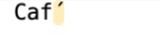
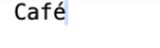
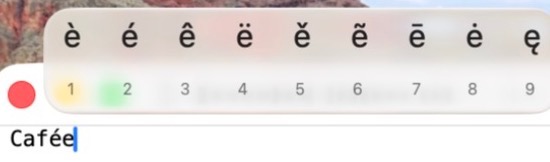
3 screenshots below were taken for AccentPad in TextEdit on macOS 26.6.2 with the ABC keyboard layout, cropped to the text and the menu. What they show is a measurement of that one Mac: another layout or macOS version may order the menu differently.
Option+E, then E: the accent key at work
Press and hold E: the accent menu
Press and hold or the Option keys: which is faster on a Mac?
Learning how to type accents on Mac starts with press and hold, then moves to the Option keys once you type accents every day. Apple's Mac User Guide (opens in a new tab) documents both and recommends the key combinations, which it calls dead keys, if you type accents often.
Press and hold needs nothing memorized. Hold a letter key and the accent menu opens with every accented form of that letter; click one, press the number under it, or move with the arrow keys and press Space.
The two differ in reach as much as in speed. Each Option accent key types only the letters listed against it in the table above, almost all of them vowels. The menu goes further: on our Mac the e menu also held ě, ẽ, ē, ė and ę, which no Option key types on the ABC layout.
A dead key is pressed and released before the letter, never held with it. That is the whole of how to type accents on Mac with keys: a mark, then a letter.
Press Option and E together, let go of both, then press E. While the mark waits, the Mac shows it highlighted, as in the first screenshot above. If the next key cannot carry the mark, you usually get the mark and the letter side by side; the measured table further down spells it out key by key.
How do you do accents on a Mac without memorizing the keys?
Let the Mac show you the keys instead of learning them. For doing accents on a Mac without memorizing anything, macOS has three built-in tools: the Keyboard Viewer, the Character Viewer and text replacement.
- The Keyboard Viewer. Click the Input menu in the menu bar and choose Show Keyboard Viewer. If the menu is missing, turn on "Show Input menu in menu bar" in System Settings, Keyboard, Text Input, Edit. Hold Option and the keys show what they type; Apple's Keyboard Viewer guide (opens in a new tab) says an orange outline marks the accent keys.
- The Character Viewer. Press Fn/Globe+E, or choose Edit, then Emoji & Symbols. Type a letter's name in the search field, such as latin small letter z with caron, and click ž. Apple's emoji and symbols guide (opens in a new tab) lists accented letters among what it finds.
- Text replacement. In System Settings, Keyboard, click Text Replacements and add a pair such as cafe and café. From then on, typing the plain word in a supporting app swaps in the accented one. Apple's text replacement guide (opens in a new tab) warns that this is not available in every app.
Text replacement suits a handful of words you type every week, such as a name or a street. The Character Viewer suits the rare letter, such as ř, ş or ő. For a whole language, learn its two or three accent keys.
What should you check when accents on a Mac stop working?
When accents on a Mac stop working, the cause is usually the keyboard layout, the app or the letter itself, in that order. Check them one at a time, starting with the layout.
- The input source. The Option keys on this page belong to the ABC and U.S. layouts, and Apple's own example names the ABC layout. Another layout can put the accents on other keys. The Keyboard Viewer shows the active layout's keys, and the Input menu switches layouts.
- The app. Apple notes that accent marks are not available in all apps. Try the same keys in TextEdit; if they work there, the other app is the cause.
- The letter. Each of the Mac accent keys has a short list of letters, and the next table names every letter it refuses. For a letter outside the list, use the menu or the Character Viewer.
- The key order. Release Option before the letter. With Option still held, a letter key types a character from the Option layer instead: Option+S types ß.
Apple also suggests the ABC – Extended input source for typing in several Latin-script languages. Its accent keys are not in AccentPad's measured tables yet, so this page does not list them.
Where do the Mac accent keys fail?
AccentPad pressed each of the 5 Option accent keys before every letter key from a to z, through macOS's own key translation, on the ABC and U.S. layouts (macOS 26.6.2, 2026-10-17). Every key gave the same result on each layout. A key outside a mark's short list does not get the mark: it types the mark as a separate symbol, then the plain letter. Option+E, then C types ´c, two characters, never ć.
| Accent key | Makes a letter with | Leaves a loose combining mark on | Types the mark, then the bare letter, for |
|---|---|---|---|
| Option+E ´ | á é í ó ú | j́ | the other 20: b c d f g h k l m n p q r s t v w x y z |
| Option+U ¨ | ä ë ï ö ü ÿ | none | the other 20: b c d f g h j k l m n p q r s t v w x z |
| Option+I ˆ | â ê î ô û | none | the other 21: b c d f g h j k l m n p q r s t v w x y z |
| Option+N ˜ | ã ñ õ | none | the other 23: b c d e f g h i j k l m p q r s t u v w x y z |
| Option+` ` | à è ì ò ù | none | the other 21: b c d f g h j k l m n p q r s t v w x y z |
Which letters have an Option key of their own on a Mac?
On the ABC and U.S. layouts, 7 letters need no accent key and no menu: one Option chord types each. They come from AccentPad's table of what every key types with Option, and with Shift and Option, on the ABC and U.S. layouts, measured on macOS 26.6.2 on 2026-10-10. Apple's Keyboard Viewer shows the same layer: hold Option and the keys show these letters.
| Letter | Keys | Capital | Keys |
|---|---|---|---|
| å | Option+A | Å | Shift+Option+A |
| ø | Option+O | Ø | Shift+Option+O |
| ç | Option+C | Ç | Shift+Option+C |
| ß | Option+S | — | No capital |
| æ | Option+' | Æ | Shift+Option+' |
| ı | Shift+Option+B | — | No capital |
| œ | Option+Q | Œ | Shift+Option+Q |
Sources:å, ø, ç (Apple) (opens in a new tab)ß, æ, ı, œ (Apple) (opens in a new tab)
Which Mac methods reach which letters?
Of the 261 letters, 31 are typed with keys alone. The other 230 need a menu or a search, so the method you pick depends on the letter, not on taste.
| Method | Letters | Example |
|---|---|---|
| A key for the mark, then the letter | 24 | For é: Option+E, then E. |
| One key combination | 7 (å ø ç ß æ ı œ) | For å: Option+A. |
| Press and hold the letter | 13 | For ē: Press and hold E, then choose ē. |
| Search for the letter by name | 217 | For ý: Fn/Globe+E, then search "latin small letter y with acute", then ý. |
Sources:Accent keys, Key chords, Press and hold (Apple) (opens in a new tab)Accent keys (Apple) (opens in a new tab)Key chords (Apple) (opens in a new tab)Search by name (Apple) (opens in a new tab)
How to type accents on a Mac, step by step
Step 1: Press Option with the mark's key
Option+E for the acute, Option+` for the grave, Option+I for the circumflex, Option+U for the umlaut and Option+N for the tilde. Let go: only a highlighted mark shows.
Step 2: Type the letter
Press E after Option+E and é replaces the highlighted mark. Hold Shift on the letter key for a capital: É.
Step 3: Press and hold a letter the keys do not reach
Hold C until the accent menu opens, then press the number under ć or click it. N, A, E and the other vowels open menus of their own.
Step 4: Open the Character Viewer for the rest
Press Fn/Globe+E, search a name such as latin small letter s with cedilla, and click ş. Type capital in place of small for Ş.
Frequently asked questions about accents on a Mac
Why does Option+E put a separate mark before c, n or s on a Mac?
The acute accent key knows five vowels only. In AccentPad's run of the ABC and U.S. layouts, Option+E followed by C typed the spacing ´ and a plain c: two characters, no accent. The same happened before n, s and z. Those letters come from the accent menu or the Character Viewer instead.
How do I type a capital letter with an accent on a Mac?
Hold Shift on the letter key, not on Option. Option+E, then Shift+E gives É; Option+U, then Shift+U gives Ü. The accent menu works the same way: press and hold Shift+E for the capitals of e.
Why does the accent menu not open when I hold a key on my Mac?
Apple's help gives two reasons: the menu is not shown for a key that has no accented forms, and accent marks are not available in every app. In an app that ignores the menu, try the Option keys or the Character Viewer instead.
Can I pick from the Mac accent menu with the number keys?
Yes. Apple's help says to press the number shown under the character, or use the arrow keys and press Space. On our Mac the menu for e numbered its nine letters 1 to 9, and é was 2. Another layout may offer a different set, so read the numbers on your own screen.
Is there a way to type accents on a Mac without learning shortcuts?
Two. The Character Viewer, opened with Fn/Globe+E or Edit, then Emoji & Symbols, searches every character by name. A text replacement, set in System Settings under Keyboard, can turn a plain word such as cafe into café while you type.